
Total Rewards
Your Total Rewards statement shows the full value of your compensation and benefits from your Ensign-affiliated employer. It’s personalized based on the pay and benefits you were eligible for and enrolled in over the past 12 months.
Your statement includes
Pay summary
Base pay and bonuses from the past 12 months, all in one place
Employer investment in benefits
Medical, dental, vision, life, and AD&D coverage
Retirement and equity
Employer contributions to your 401(k), equity awards, and Social Security/Medicare
Vacation value
The calculated worth of your annual vacation allowance
Current balances
Your 401(k) retirement plan and equity award values
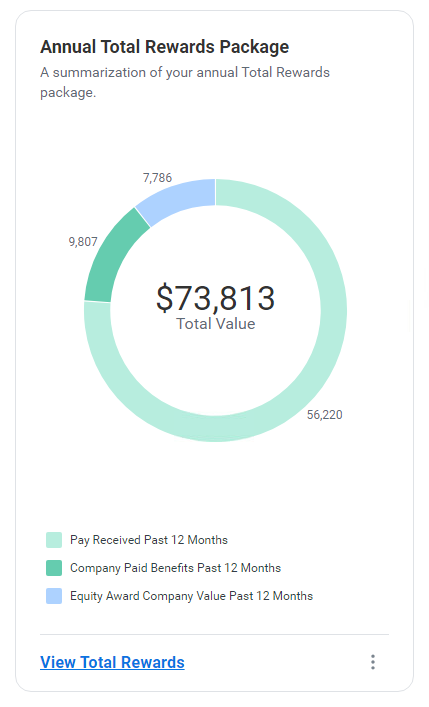
Sample breakdown from the Workday Benefits and Pay Hub
How to Access Your Statement
You can find your Total Rewards statement in Workday under the Benefits and Pay Hub:
Log in to Workday.
From the landing page, click Benefits and Pay.
Select View Total Rewards.
Workday Total Rewards Statement FAQ
Where can I find my Total Rewards Statement?
Your statement is available in Workday under the new Benefits and Pay section. From the Workday landing page (when you first log in), click on Benefits and Pay.
Then you will click on view Total Rewards on the next landing page.
Who is receiving a statement?
Every active affiliate employee will have access to the statement in Workday.
What period of time does this statement include?
Pay Received & Benefit sections are dynamic and update after each pay period closes.
Account balance detail (such as 401(k) or Equity) are updated quarterly and fed into Workday from the outside recordkeepers. We are adding this detail now as a foundation for future enhancements.
Why is the value of employer paid Social Security and Medicare contributions included?
Because this is a federally recognized component of employer sponsored retirement benefits that protect you now and in the future.
Will I receive this statement again in the future?
Your statement is always available in Workday.
Who should I contact if I have questions on my statement?
Feel free to reach out to the Total Rewards Team with any questions: